FujiFilm X-A5 New Features Manual
Specifications
| Brand | FujiFilm |
| Model | X-A5 |
| Category | Digital Camera |
| File type | New Features Manual (PDF) |
| Language | English |
FujiFilm X-A5 PDF Manual: Read Online
Use the built-in viewer to read the manual online without downloading the PDF.
How to Use This Guide
- Read Online: Scroll down to view the full interactive manual directly in your browser.
- Download PDF: Click the "Download" button to save a high-quality, printable version for offline use.
- Searchable Content: Use Ctrl + F (Cmd + F on Mac) within the online viewer to quickly locate specific error codes, parts lists, or schematics.
Jump to Page



Important Sections from This Manual
Below are selected important pages and sections. Click a page to quickly identify the information you need.
- New Features Guide p. 1
- X-A5 fi rmware version 2.00 adds or updates the features p. 2
- Changes and Additions p. 3
- X-A5 Owner’s Manual: P 59 p. 4
- X-A5 Owner’s Manual: P 60 p. 5
View Extracted Full Text
New Features Guide
Version 2.00
Features added or changed as a result of fi rmware updates may no
longer match the descriptions in the documentation supplied with
this product. Visit our website for information on the updates avail-
able for diff erent products:
http://www.fujifilm.com/support/digital_cameras/software/fw_table.html
BL00005024-200
EN

New Features Guide
Version 2.00
Features added or changed as a result of fi rmware updates may no
longer match the descriptions in the documentation supplied with
this product. Visit our website for information on the updates avail-
able for diff erent products:
http://www.fujifilm.com/support/digital_cameras/software/fw_table.html
BL00005024-200
EN

Contents
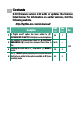
X-A5 fi rmware version 2.00 adds or updates the features
listed below. For information on earlier versions, visit the
following website.
http://fujifilm-dsc.com/en/manual/
No.
Description
X-A5
P
See
P
Ver.
1
A “bright mode” option has been added to S
(ADVANCED SR AUTO) for brighter, more vivid photos.
48
1
2.00
2
The number of enhancement levels for h PORTRAIT
ENHANCER (Z) mode has increased from three to
fi ve.
16, 59
–
3
Rotating the mode dial to O now selects o NIGHT+
mode.
59
2
4
The O NIGHT option previously accessed via the mode
dial has been added to the options available in SP (scene
position) mode.
60
3

Contents
X-A5 fi rmware version 2.00 adds or updates the features
listed below. For information on earlier versions, visit the
following website.
http://fujifilm-dsc.com/en/manual/
No.
Description
X-A5
P
See
P
Ver.
1
A “bright mode” option has been added to S
(ADVANCED SR AUTO) for brighter, more vivid photos.
48
1
2.00
2
The number of enhancement levels for h PORTRAIT
ENHANCER (Z) mode has increased from three to
fi ve.
16, 59
–
3
Rotating the mode dial to O now selects o NIGHT+
mode.
59
2
4
The O NIGHT option previously accessed via the mode
dial has been added to the options available in SP (scene
position) mode.
60
3

1
Changes and Additions
Changes and additions are as follows.
X-A5 Owner’s Manual: P 48
Ver. 2.00
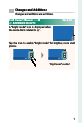
S ADVANCED SR AUTO
A “bright mode” icon is displayed when
the mode dial is rotated to S.
Tap the icon to enable “bright mode” for brighter, more vivid
photos.
“Bright mode” enabled

1
Changes and Additions
Changes and additions are as follows.
X-A5 Owner’s Manual: P 48
Ver. 2.00
S ADVANCED SR AUTO
A “bright mode” icon is displayed when
the mode dial is rotated to S.
Tap the icon to enable “bright mode” for brighter, more vivid
photos.
“Bright mode” enabled

2
X-A5 Owner’s Manual: P 59
Ver. 2.00
 SP SCENE POSITION /h/M/N/O
Rotating the mode dial to O selects
o NIGHT+ mode.
The following scenes can be selected directly using the
mode dial:
Scene
Scene
Description
Description
h PORTRAIT
PORTRAIT
ENHANCER (
ENHANCER (Z)
Choose for a smooth skin eff ect when shooting por-
traits. If ON is selected for K TOUCH SCREEN
SETTING, you can choose the portrait enhance-
ment level using touch controls.
M LANDSCAPE
LANDSCAPE
Choose for daylight shots of buildings and land-
scapes.
N SPORT
SPORT
Choose when photographing moving subjects.
O NIGHT+ (
NIGHT+ (o)
The camera automatically optimizes brightness and
saturation for night scenes, including shots with por-
trait subjects.

2
X-A5 Owner’s Manual: P 59
Ver. 2.00
 SP SCENE POSITION /h/M/N/O
Rotating the mode dial to O selects
o NIGHT+ mode.
The following scenes can be selected directly using the
mode dial:
Scene
Scene
Description
Description
h PORTRAIT
PORTRAIT
ENHANCER (
ENHANCER (Z)
Choose for a smooth skin eff ect when shooting por-
traits. If ON is selected for K TOUCH SCREEN
SETTING, you can choose the portrait enhance-
ment level using touch controls.
M LANDSCAPE
LANDSCAPE
Choose for daylight shots of buildings and land-
scapes.
N SPORT
SPORT
Choose when photographing moving subjects.
O NIGHT+ (
NIGHT+ (o)
The camera automatically optimizes brightness and
saturation for night scenes, including shots with por-
trait subjects.

3
X-A5 Owner’s Manual: P 60
Ver. 2.00
 SP SCENE POSITION /h/M/N/O
 3 Highlight one of the following options and press MENU/OK.
Scene
Scene
Description
Description
h PORTRAIT
PORTRAIT
Choose for portraits.
O NIGHT
NIGHT
Choose for poorly lit twilight or night scenes.
H NIGHT (TRIPOD)
NIGHT (TRIPOD)
Choose this mode for slow shutter speeds when
shooting at night.
p FIREWORKS
FIREWORKS
Slow shutter speeds are used to capture the expand-
ing burst of light from a fi rework.
Q SUNSET
SUNSET
Choose this mode to record the vivid colors in sun-
rises and sunsets.
R SNOW
SNOW
Choose for crisp, clear shots that capture the bright-
ness of scenes dominated by shining white snow.
s BEACH
BEACH
Choose for crisp, clear shots that capture the bright-
ness of sunlit beaches.
U PARTY
PARTY
Capture indoor background lighting under low-light
conditions.
V FLOWER
FLOWER
Eff ective for taking more vivid shots of fl owers.
W TEXT
TEXT
Take clear pictures of text or drawings in print.
j MULTIPLE
MULTIPLE
EXPOSURE
EXPOSURE
Create a photograph that combines two exposures.

3
X-A5 Owner’s Manual: P 60
Ver. 2.00
 SP SCENE POSITION /h/M/N/O
 3 Highlight one of the following options and press MENU/OK.
Scene
Scene
Description
Description
h PORTRAIT
PORTRAIT
Choose for portraits.
O NIGHT
NIGHT
Choose for poorly lit twilight or night scenes.
H NIGHT (TRIPOD)
NIGHT (TRIPOD)
Choose this mode for slow shutter speeds when
shooting at night.
p FIREWORKS
FIREWORKS
Slow shutter speeds are used to capture the expand-
ing burst of light from a fi rework.
Q SUNSET
SUNSET
Choose this mode to record the vivid colors in sun-
rises and sunsets.
R SNOW
SNOW
Choose for crisp, clear shots that capture the bright-
ness of scenes dominated by shining white snow.
s BEACH
BEACH
Choose for crisp, clear shots that capture the bright-
ness of sunlit beaches.
U PARTY
PARTY
Capture indoor background lighting under low-light
conditions.
V FLOWER
FLOWER
Eff ective for taking more vivid shots of fl owers.
W TEXT
TEXT
Take clear pictures of text or drawings in print.
j MULTIPLE
MULTIPLE
EXPOSURE
EXPOSURE
Create a photograph that combines two exposures.