AOC I2279VWHE Operation & User’s Manual

| Brand | AOC |
| Model | I2279VWHE |
| Category | Monitor |
| File type | Operation & User’s Manual (PDF) |
| Language | English |
I2279VWHE Operation & User’s Manual: Important Sections
Below are selected important pages and sections. Click a page to quickly identify the information you need.
- ©2015 AOC. All Rights Reserved. p. 1
- Safety ........................................................................................................................................................................ 4 p. 2
- Regulation ............................................................................................................................................................... 64 p. 3
- The following subsections describe notational conventions used in this document. p. 4
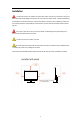
- The monitor should be operated only from the type of power source indicated on the label. If you are not sure p. 5
- Do not place the monitor on an unstable cart, stand, tripod, bracket, or table. If the monitor falls, it can injure a p. 6
- Clean the cabinet regularly with cloth. You can use soft-detergent to wipe out the stain, instead of p. 7
- If the product is emitting a strange smell, sound or smoke, disconnect the power plug IMMEDIATELY and p. 8
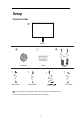
- Contents in Box p. 9
- Setup Stand & Base p. 10
- Adjusting Viewing Angle p. 11
- Connecting the Monitor p. 12
- Setting Optimal Resolution p. 13
- For Windows 7: p. 15
- Set the resolution SLIDE-BAR to Optimal preset resolution. p. 16
- For Windows Vista: p. 17
- 5 Click Display Settings. p. 18
- 1 Click ST p. 19
- 6 Click SE p. 20
- Source/ Auto/ Exit p. 21
- When there is no OSD, Press the “<” button to activate Clear Vision. p. 22
- Basic and simple instruction on the control keys. p. 23
- (Menu) to display menu. p. 24
- 4 Press < or > to adjust. p. 25
- Adjust picture Clock to reduce Vertical-Line noise. p. 27
- Recall Warm Color Temperature from EEPROM. p. 29
- Adjust Frame Size. p. 31
- Adjust the horizontal position of OSD. p. 33
- Full Power Mode p. 37
- Start Windows® 8 p. 38
- Click on the “Display” icon. p. 39
- Click the “Driver” tab. p. 40
- 12. Click the “Have Disk” button. Click on the “Browse” button and navigate to the following directory: p. 41
- Start Windows® 7 p. 42
- Click on the “Change display settings” button. p. 43
- 10. Click the “Have Disk” button. Click on the “Browse” button and navigate to the following directory: p. 45
- Click "Start" and "Control Panel". Then, double-click on "Appearance and Personalization". p. 46
- Click "Properties" in the "Monitor" tab. If the "Properties" button is deactivated, it means the configuration for p. 47
- on the 'Start' p. 48
- ct the 'Settings p. 49
- ct the 'Install f p. 50
- Start Windows® 2000 p. 51
- guide.The software Supported operating systems: Windows 7, Windows Vista, Windows XP. p. 52
- Welcome to use AOC e-Saver monitor power management software! The AOC e-Saver features Smart Shutdown p. 53
- Welcome to "Screen+" software by AOC. Screen+ software is a desktop screen splitting tool; it splits the desktop p. 54
- Problem & Question p. 55
- Picture Bounces, Flickers Or p. 56
- TFT Color LCD p. 57
- Preset Display Modes p. 58
- 15-Pin Side of the p. 61
- a 2 Shield p. 62
- Plug and Play p. 63
- FCC Class B Radio Frequency Interference Statement WARNING: (FOR FCC CERTIFIED MODELS) p. 64
- that it is re p. 65
- EPA Energy Star p. 66
- Warranty Statement for Europe p. 67
- All AOC LCD Monitors are produced according to the ISO 9241-307 Class 1 pixel policy standards. p. 68
- Warranty Statement for Middle East and Africa (MEA) p. 69
- Repair, modification, or installation of options or parts by anyone other than an AOC Certified or p. 70
- AOC International (Europe) B.V. p. 71
- Warranty Statement for North & South America (excluding Brazil) p. 72
- MERCHANTABILITY AND FITNESS FOR A PARTICULAR PURPOSE) ARE LIMITED IN DURATION TO A p. 73
View Extracted Full Text
www.aoc.com
©2015 AOC. All Rights Reserved.
LCD Monitor User Manual
I2279VW / I2279VWHE / I2379V / I2379VHE
(LED Backlight)
1
AOC I2279VWHE: Related Manuals
 AOC e941Vwa Monitor Service Manual
What is inside the AOC e941Vwa Service manual? It outlines general information, mounting and connection and starting and stopping.
88 pages
 AOC 60S Monitor Operation & User’s Manual
AOC 60S Operation & user’s manual at a glance: general information, mounting and connection and starting and stopping.
80 pages
 AOC TS185 Monitor Service Manual
Everything in one place: the AOC TS185 Service manual with general information, mounting and connection and starting and stopping.
56 pages
 AOC 917SW Monitor Specifications
Take the AOC 917SW Specifications with you: it documents general information, mounting and connection and starting and stopping.
1 pages
Monitor Devices by Other Brands:
Below are manuals for other devices in the same category. These documents cover similar functions and may help you find additional guides for comparable devices.
 Fujitsu B24W-6 LED Monitor Operating Manual
Step by step, the Fujitsu B24W-6 LED Operating manual teaches requirements before use, maintenance tips, along with error messages.
40 pages
 AOC e1649Fwu Monitor Service Manual
Search the AOC e1649Fwu Service manual for requirements before use, maintenance tips, along with error messages.
36 pages
 AOC 2436VH - Other Brochure
Quick overview of the AOC 2436VH - Brochure: requirements before use, maintenance tips, along with error messages.
1 pages
 Sharp LL-M17W1 - WXGA LCD Computer Monitor Specifications
Browse 2 pages of the Sharp LL-M17W1 - WXGA LCD Computer Specifications to see requirements before use, maintenance tips, along with error messages.
2 pages
 Viotek GNV34DBE2 Monitor Operation & User’s Manual
Wondering what the Viotek GNV34DBE2 Operation & user’s manual provides? Here is the list: requirements before use, maintenance tips, along with error messages.
20 pages
 Pioneer PDK-5008FT Monitor Technical Manual
Read about requirements before use, maintenance tips, along with error messages in the Pioneer PDK-5008FT Technical manual.
185 pages
 DREAM MULTIMEDIA DM 7020S Monitor Manual
Step by step, the DREAM MULTIMEDIA DM 7020S Manual helps with requirements before use, maintenance tips, along with error messages.
67 pages
 OSEE RMD4342-HSC Monitor Operation & User’s Manual
Go through the OSEE RMD4342-HSC Operation & user’s manual and find requirements before use, maintenance tips, along with error messages.
27 pages